Build and Kill Zombies Walkthrough: Craft the Best War Car
Master the apocalypse with our Build and Kill Zombies walkthrough. Learn vehicle crafting strategies, redeem latest codes, and survive the undead horde easily.
Video Guide
How to Play Build and Kill Zombies Roblox Full GuideTable of Contents
Surviving the apocalypse requires more than just quick reflexes; it demands a masterpiece of engineering. In this comprehensive build and kill zombies walkthrough, we will dive deep into the mechanics of vehicle construction, resource management, and combat tactics to help you dominate the wasteland. Whether you are playing the popular Roblox hit or exploring the gritty world of Deadpoly, understanding how to effectively build and kill zombies walkthrough steps is the difference between becoming a legend or becoming lunch.
Quick Start Guide
To succeed, you must master the gameplay loop: Roll for parts in your base, assemble your vehicle using the Build menu (B), drive into the field to harvest cash from zombies (F), and return to upgrade before your fuel hits zero.
Understanding the Core Gameplay Loop
The essence of any successful build and kill zombies walkthrough lies in mastering the cycle of acquisition and execution. The game is divided into two distinct phases: the Preparation Phase and the Action Phase. During Preparation, you are a mechanic, sifting through parts to create a synergy of speed and power. During the Action Phase, you are a survivor, navigating treacherous fields of the undead to secure the funds needed for your next upgrade.
According to community reports, the most common mistake for new players is over-extending during the early driving phase. Your initial vehicle will have limited fuel and durability. It is vital to keep an eye on your fuel gauge; if it hits 0% while you are surrounded by a horde, you risk losing your momentum. Pressing 'F' to return to base is not a sign of defeat—it is a tactical reset that allows you to reinvest your hard-earned cash into better engines and fuel tanks.
Phase
Primary Objective
Key Controls
Preparation
Roll for parts and attach them to the chassis
B (Build Menu), Mouse (Place)
Combat
Run over zombies to earn Cash and Tokens
W, A, S, D (Drive), Space (Jump)
Recovery
Return to base to refuel and upgrade
F (Return to Base)
Progression
Purchase Skills to boost luck and slots
Skills Menu (UI)
The Art of Vehicle Construction
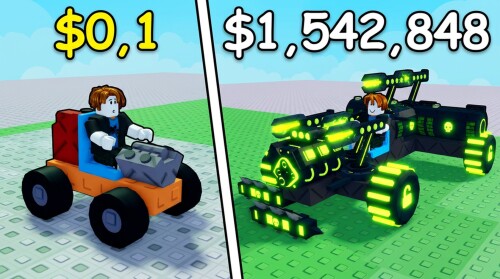
Building a car in this game is not just about aesthetics; every block, wheel, and engine affects your performance. The Build menu, accessed by pressing 'B', is your primary tool. Here, you can place various components onto your vehicle chassis. The game uses a rarity system for parts, ranging from Common to Mythic. According to player experience, focusing on high-rarity Engines and Fuel Tanks should be your priority in the early game.
When you roll for parts, you can select specific categories to target. If your car is currently stalling out too quickly, focus your rolls on the "Fuel" category. If you find yourself unable to push through larger clusters of zombies, you need more "Blocks" for weight and "Engines" for horsepower.
Component Rarity and Impact
The rarity of a part significantly dictates its efficiency. A Legendary engine provides exponentially more torque than an Epic one, allowing you to maintain speed even when hitting heavy targets.
Rarity
Performance Multiplier
Recommended Strategy
Common/Uncommon
1.0x - 1.5x
Use only for initial filler blocks.
Rare
2.0x
Good for early-game wheels and supports.
Epic
3.5x
The baseline for mid-game survival.
Legendary
5.0x+
Priority for Engines and Fuel Tanks.
Mythic+
Variable
Game-changing stats; build your car around these.
Advanced Combat Tactics and Cash Farming
Once your vehicle is road-ready, it is time to engage the horde. This build and kill zombies walkthrough emphasizes that "killing" is your primary source of income. As you drive across the field, you earn cash based on two factors: the distance you travel and the number of zombies you successfully neutralize.
Community reports suggest that driving in a straight line is rarely the most efficient path. Instead, look for "Z-Clusters"—dense groups of zombies that can be mowed down in a single pass. However, be wary of ramps. While jumping over ramps provides a thrill, landing poorly can flip your vehicle or lead you into a dead zone where fuel consumption outweighs the cash gain.
The Gap Strategy
If your vehicle is low on health or fuel, you don't always have to fight. Use the gaps between zombie clusters to maneuver safely. The game allows for precise steering, so threading the needle between two groups can save your run.
Utilizing Codes for a Head Start
One of the best ways to accelerate your progress in this build and kill zombies walkthrough is by utilizing developer-provided codes. These codes offer free cash, engine parts, and event tokens that can bypass hours of early-game grinding. Based on the latest updates from Pocket Tactics, these codes are essential for any new player looking to build a competitive rig quickly.
Active Codes (September 2026)
Code
Reward
Best Use Case
COMMUNITY
1k Cash, Small Engine, Small Tank
Perfect for building your first functional car.
CashDrop
500 Cash
Use this to buy your first few Skill upgrades.
MOREFRIENDS
Two Passenger Seats
Essential for co-op play sessions.
HACKER
50 Hacker Tokens
Save these for the special Event Shop.
1x1x1x1
150 Hacker Tokens
High-value currency for mid-game upgrades.
To redeem these, simply launch the game, open the Shop menu, scroll to the bottom, and paste the code into the redemption box.
Deadpoly: A Different Kind of Survival
While the Roblox version focuses on vehicular mayhem, many players seeking a build and kill zombies walkthrough might be referring to the survival-crafting title, Deadpoly. In this game, the building is more stationary but no less vital. You aren't just building a car; you are building a sanctuary.
In Deadpoly, the initial focus should be on gathering basic materials like wood and metal. A fire axe is a top-tier starting tool, allowing you to harvest wood from trees and scrap metal from abandoned cars. Base building here involves placing defensive structures like wooden stakes at entrances to prevent zombies from breaching your perimeter.
Deadpoly Survival Tips:
Scavenging: Look for grocery stores early. Items like water jugs and canned food are non-negotiable for survival.
Night Cycle: The world becomes pitch black at night. If you don't have a flashlight or a well-lit base, it is often safer to stay put until sunrise.
Death Penalty: If you die, you lose your inventory. However, you can often return to your "corpse" to retrieve your items if you act quickly.
Skill Upgrades and Long-term Progression
As you accumulate cash, you should navigate to the Skills menu. Skills provide permanent buffs that apply to your character regardless of which car you are currently driving. This is where the true depth of the build and kill zombies walkthrough comes into play. You aren't just upgrading a machine; you are upgrading your account's potential.
Skill Name
Effect
Why It Matters
Luck Boost
Increases rarity of rolled parts
Essential for finding Mythic engines.
Support Slots
Allows more support items on the car
Increases overall utility and defense.
Roll Efficiency
Lowers the cost of rolling for parts
Allows for more frequent upgrades.
Fuel Economy
Reduces fuel consumption rate
Lets you stay in the field longer to earn more cash.
Investing in "Luck Boost" early is a community-recommended strategy. Higher luck means you will spend less cash rolling for parts in the long run, as you'll encounter Rare and Epic items much more frequently.
Co-op Mechanics: Building Together
Survival is better with friends. The co-op feature allows players to join the same server and even build vehicles together. In a cooperative environment, one player can focus on the driving and navigation while the other manages the "Support" items or simply enjoys the ride in a passenger seat (which can be obtained via the MOREFRIENDS code).
When building together, communication is key. Player A might have a Legendary engine but no fuel tank, while Player B has an abundance of high-tier wheels. By coordinating your resources, you can create a "Super Car" far earlier than you would be able to solo.
Fuel Sharing
In co-op mode, remember that a larger vehicle with more passengers often consumes fuel faster if not properly optimized. Ensure both players have invested in the Fuel Economy skill to maximize your joint runs.
Common Mistakes to Avoid
Even seasoned players can stumble. Here are the most frequent errors identified in community reports:
Ignoring the Index: The Index tracks all the parts you've unlocked and their stats. Use it to compare parts before committing to a build.
Neglecting Support Slots: Blocks provide health, but Support items often provide unique bonuses like speed boosts or damage resistance.
Forgetting to Save Presets: Once you find a build that works, save it as a preset. This allows you to quickly rebuild after an experiment goes wrong.
Over-rolling: Don't spend all your cash rolling for a specific Mythic part if your current engine is only Common. Balance your upgrades across all categories.
Conclusion: Mastering the Undead
Becoming a master of the build and kill zombies walkthrough requires a balance of mechanical creativity and tactical driving. By leveraging codes for an early advantage, focusing on high-rarity parts like engines and fuel tanks, and investing in long-term skills, you can transform a basic chassis into a zombie-crushing juggernaut.
Remember that the game is as much about the journey as the destination. Experiment with different car builds, join forces with friends in co-op mode, and always keep an eye on that fuel gauge. The apocalypse is waiting—it's time to build, drive, and survive.
</hr>
FAQ: Build and Kill Zombies Walkthrough
How do I get more cash quickly in Build and Kill Zombies?
The most efficient way to earn cash is to focus on "Z-Clusters" (dense groups of zombies) and maintain a long distance from your base. The further you travel and the more zombies you hit, the higher your payout. Additionally, using codes like CashDrop and COMMUNITY provides an immediate financial boost for new players.
What is the best part to upgrade first?
In almost every build and kill zombies walkthrough, the recommendation is to prioritize your Engine and Fuel Tank. A better engine allows you to plow through larger groups without losing speed, while a larger fuel tank extends your time in the field, leading to higher total earnings per run.
Can I play Build and Kill Zombies with friends?
Yes! The game features a built-in co-op mode. As long as you are on the same server, you can interact with other players, build vehicles together, and even ride as passengers. Make sure to use the code MOREFRIENDS to unlock extra passenger seats for your vehicle.
What happens when my car runs out of fuel?
When your fuel reaches 0%, your vehicle will stop moving. At this point, you should press the 'F' key to return to your home base. You won't lose your car, but you will need to refuel and potentially upgrade your parts before heading out for your next run.